

Generating a supplement facts panel is the process of creating a legally required label that lists every dietary ingredient in a supplement, its amount per serving, and its % Daily Value, formatted precisely under FDA 21 CFR 101.36. This is not optional formatting. Every dietary supplement sold in the United States must carry a compliant Supplement Facts panel, and errors trigger warning letters, recalls, and misbranding charges. Tools like ReciPal, Food Label Maker, and the Nutrasmarts Supplement Facts Tool automate the process, but you still need to understand the underlying rules to catch what software misses.
What are the required components of a supplement facts panel?
The Supplement Facts panel is the most scrutinized element on any dietary supplement label, and formatting errors cause the majority of compliance failures during FDA audits. Knowing exactly what belongs on the panel is your first line of defense.
Every compliant panel must include the following mandatory elements:
- Serving size declared in a common household measure plus the metric equivalent (e.g., "2 capsules (1.2 g)")
- Servings per container listed directly below serving size
- Dietary ingredients with the amount per serving in the appropriate unit (mg, mcg, IU)
- % Daily Value (% DV) for each ingredient that has an established FDA reference amount
- Dagger symbol (†) in the % DV column for any ingredient without an established Daily Value, paired with a matching footnote
- Bold horizontal lines separating the header, serving information, and ingredient columns
- Minimum font sizes as specified under 21 CFR 101.36 to maintain legibility
The panel header must read "Supplement Facts" in bold, not "Nutrition Facts." That distinction matters legally. Supplement Facts panels differ from Nutrition Facts panels in both legal standing and required format. Attempting to adapt a Nutrition Facts template for a supplement is one of the most common causes of FDA compliance failures.
Beyond the panel itself, full label compliance requires a statement of identity ("Dietary Supplement"), net quantity of contents, allergen declaration, manufacturer name and address, and any required structure/function claim disclaimers. These elements surround the panel but are equally non-negotiable.
Pro Tip: Download the Nutrasmarts 2026 FDA label requirements checklist before you finalize any label. It covers every mandatory element in a single reference document.
How do you correctly list ingredients and handle proprietary blends?
Ingredient order on a Supplement Facts panel is not at the manufacturer's discretion. FDA mandates a strict sequence: vitamins and minerals with established Daily Values appear first, followed by other dietary ingredients with established DVs, then dietary ingredients without established DVs. Deviating from this order constitutes misbranding.
Here is the correct process for listing ingredients:
- List vitamins and minerals first. Use the names and units specified in 21 CFR 101.9 (e.g., Vitamin D3 as mcg, not IU, under the updated rules).
- Follow with other dietary ingredients that have established DVs. Omega-3 fatty acids and certain minerals fall into this category.
- List ingredients without established DVs last. Herbs, botanicals, and novel compounds belong here.
- Declare proprietary blends as a group. The blend name appears with its total weight, followed by each component in descending order by weight.
- List non-dietary ingredients separately. Excipients like magnesium stearate, silicon dioxide, and gelatin capsule material go under "Other Ingredients" outside the panel box.
Proprietary blends require special attention. The total blend weight must appear immediately after the blend name, and individual ingredients within the blend must be listed in descending order by weight, not alphabetically or by perceived potency. Misordering ingredients inside a blend is a direct misbranding risk.
The dagger footnote rule applies inside blends too. If any ingredient within a proprietary blend lacks an established Daily Value, it needs the dagger symbol. Missing the dagger or its footnote invalidates compliance for that ingredient, even if every other element is correct. This is a detail that manual label builders miss constantly.

What software tools are best for creating compliant panels in 2026?
The top supplement facts panel software options in 2026 automate the most error-prone parts of label generation: ingredient ordering, rounding rules, % DV calculations, and formatting. Automated tools import formulation data and apply FDA rounding and formatting rules without requiring you to memorize every regulatory detail.
| Tool | Key Strength | Pricing Model |
|---|---|---|
| ReciPal | Automated FDA rounding and formatting | Free tier; paid plans for advanced features |
| Food Label Maker | Compliance error flagging and audit trail | Subscription-based |
| Nutrasmarts Supplement Facts Tool | 800+ ingredient database with DV data | Free to use |
Each tool takes a different approach. ReciPal and Food Label Maker are strong for food and supplement manufacturers who need batch processing and export options. The Nutrasmarts tool is built specifically for supplement formulators who need accurate Daily Value data tied to peer-reviewed sources, not just a blank template.
Brands that build labels from scratch without FDA-spec templates consistently fail on technical details: column alignment, required statements, and font minimums. Using prebuilt compliant templates eliminates that category of error entirely.
Font and formatting rules are stricter than most formulators expect. Improper formatting causes products to be flagged as misbranded even when the ingredient data is completely accurate. The label can be scientifically correct and still fail a regulatory review because a font is one point too small.
Pro Tip: After generating your label in any software, run it against the supplement label audit process checklist before sending files to your printer or contract manufacturer.
Step-by-step process to generate a supplement facts panel
Generating a compliant panel follows a defined sequence. Skipping steps or reordering them creates errors that are expensive to fix after printing.
- Collect verified ingredient quantities. Obtain certificate of analysis (COA) data for every ingredient. Use the exact amounts per serving, not target amounts, since rounding rules apply to the final declared value.
- Determine serving size and servings per container. Express serving size in a common household unit plus metric weight. Confirm the number of servings based on total fill weight.
- Apply FDA ingredient order. Sort ingredients into the three-tier sequence: vitamins and minerals with DVs, other ingredients with DVs, then ingredients without DVs.
- Calculate % Daily Values. Use the reference amounts in FDA 21 CFR 101.9, based on a 2,000-calorie adult diet. Divide the amount per serving by the reference amount and multiply by 100.
- Assign dagger symbols and footnotes. Every ingredient without an established DV gets a † in the % DV column and the footnote "† Daily Value not established" at the bottom of the panel.
- Format the panel to FDA spec. Apply bold lines, correct column headers, minimum font sizes, and the "Supplement Facts" header. Check font size requirements for your label dimensions.
- Add surrounding label elements. Include the statement of identity, net quantity, allergen statement, manufacturer address, and any required disclaimers for structure/function claims.
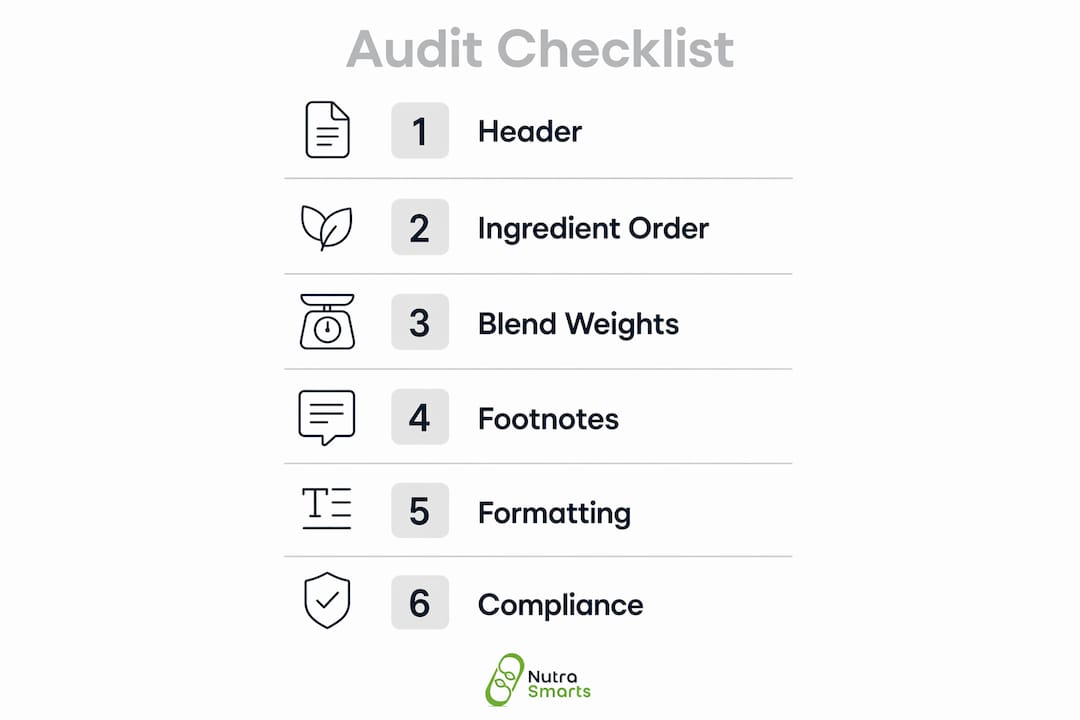
- Run a compliance audit. Compare the final label against 21 CFR 101.36 requirements or use a regulatory checklist. Flag any missing elements before approving for print.
The table below shows the most common audit checkpoints and what failure looks like in practice.
| Audit Checkpoint | Common Failure Mode |
|---|---|
| Header reads "Supplement Facts" | Header reads "Nutrition Facts" instead |
| Ingredient order follows FDA sequence | Ingredients listed alphabetically |
| Dagger symbols present for all non-DV ingredients | Dagger present but footnote missing |
| Font sizes meet minimum requirements | Panel reduced to fit label without resizing fonts |
| Proprietary blend total weight declared | Blend listed without combined weight |
| Other Ingredients listed outside panel box | Excipients listed inside the Supplement Facts box |
Troubleshooting tip: if your software flags a rounding conflict, check whether you are using the pre-rounding or post-rounding value in your formulation sheet. FDA rounding rules apply to the declared value, not the raw COA number.
Key Takeaways
Generating a compliant supplement facts panel requires strict adherence to FDA 21 CFR 101.36, correct ingredient ordering, accurate % DV calculations, and validated formatting before any label goes to print.
| Point | Details |
|---|---|
| FDA format is mandatory | Use the Supplement Facts panel exclusively; never adapt a Nutrition Facts template for supplements. |
| Ingredient order is regulated | List vitamins and minerals first, then other dietary ingredients by DV status, in strict FDA sequence. |
| Dagger footnotes are required | Every ingredient without an established Daily Value needs a dagger symbol and matching footnote. |
| Formatting errors cause misbranding | Incorrect font sizes, missing bold lines, or wrong column headers trigger FDA violations regardless of accurate data. |
| Software reduces compliance risk | Tools like ReciPal, Food Label Maker, and Nutrasmarts automate rounding, ordering, and formatting to minimize errors. |
Why most label compliance failures are avoidable
The supplement industry treats FDA compliance as a finish-line problem. Formulators build the product, finalize the formula, and then try to fit it onto a label. That sequence is backwards, and it explains why so many labels fail.
At Nutrasmarts, we have worked through hundreds of formulations with manufacturers who arrived at the label stage with ingredient lists that violated FDA order requirements, proprietary blends with no declared total weight, and panels formatted with Nutrition Facts templates. Every one of those problems was preventable if compliance had been built into the formulation process from the start.
The legal distinction between Supplement Facts and Nutrition Facts panels is not a technicality. It reflects a fundamentally different regulatory framework. Supplements are not foods under FDA law, and their labels are held to different standards. Treating them as interchangeable is the single most common mistake we see from brands entering the market for the first time.
Proprietary blends are the second major failure point. Manufacturers use them to protect formulas, which is legitimate. But the protection does not extend to hiding the total blend weight or reordering ingredients by potency rather than weight. The FDA is explicit on this, and the non-compliant label examples we have documented show how quickly these errors escalate to warning letters.
Our honest recommendation: use compliant software from day one, validate with a regulatory checklist before print, and treat the Supplement Facts panel as a technical document, not a design element. Consumer trust in supplement transparency depends on labels that are accurate and verifiable, not just visually polished.
— Nutrasmarts
Create compliant labels faster with Nutrasmarts
Nutrasmarts built its free Supplement Facts label creator specifically for formulators who need accuracy without the complexity of spreadsheets. The tool draws from a database of over 800 ingredients, each linked to peer-reviewed studies and current FDA Daily Value reference amounts, so your % DV calculations start from verified data.

The generator applies FDA formatting rules automatically, including bold lines, column structure, dagger footnotes, and font minimums. You can customize the output for your brand and export a print-ready file. For manufacturers targeting specific health categories, Nutrasmarts also publishes reviewed supplement directories covering metabolic health and athletic performance segments, giving formulators market context alongside compliance tools.
FAQ
What is a supplement facts panel?
A Supplement Facts panel is the FDA-mandated label on every dietary supplement sold in the United States, listing all dietary ingredients, amounts per serving, and % Daily Values in a format specified under 21 CFR 101.36.
How is a supplement facts panel different from a nutrition facts panel?
The two panels are legally distinct. Supplement Facts panels are required exclusively for dietary supplements, while Nutrition Facts panels apply to conventional foods. Using a Nutrition Facts format on a supplement is a direct FDA compliance violation.
What order do ingredients appear in on a supplement facts panel?
Vitamins and minerals with established Daily Values appear first, followed by other dietary ingredients with DVs, then ingredients without established DVs. This sequence is strictly mandated by FDA and is not at the manufacturer's discretion.
Do proprietary blends need to list individual ingredient amounts?
No, but the total blend weight must be declared, and each ingredient within the blend must be listed in descending order by weight. Individual amounts can remain undisclosed, but ingredient order by weight is required.
What happens if a supplement label has formatting errors?
FDA can classify the product as misbranded even if the ingredient data is accurate. Formatting violations, including incorrect font sizes, missing bold lines, or wrong header text, carry the same regulatory consequences as factual errors on the label.